Nova builds the campaign, finds the people, writes every message and answers the replies, on LinkedIn and email. You decide how much it does on its own.
Outreach tools get you to “sent”. Nova gets you to the meeting.
The campaign is the easy part. The reply lands at 11pm, sits in an inbox for two days, and the deal cools. Every tool leaves that part to you.
Nova takes the whole run. It builds the campaign, writes the messages, answers the reply from what you’ve taught it, checks with you when it isn’t sure, and puts the call on your calendar.
One prospect, start to finish
Where outreach tools stop
Found
Matched to the people you sell to, from your website and your best customers
Written
A first message from what they’ve posted, not a template
Sent
Invite accepted, first message delivered, at a pace your account can take
Everything below this line is usually your job.
Where Nova keeps going
Replied
“Interesting. How does it work, and what would it cost for a team of twelve?”
Answered
From your knowledge: your site, your docs, your pricing. Nothing invented.
Checked with you
The price for twelve seats goes to you first, then to them
Meeting booked
A real slot on your calendar, invite sent, the thread attached
Nova in the app · works for you
Say it. Nova does it.
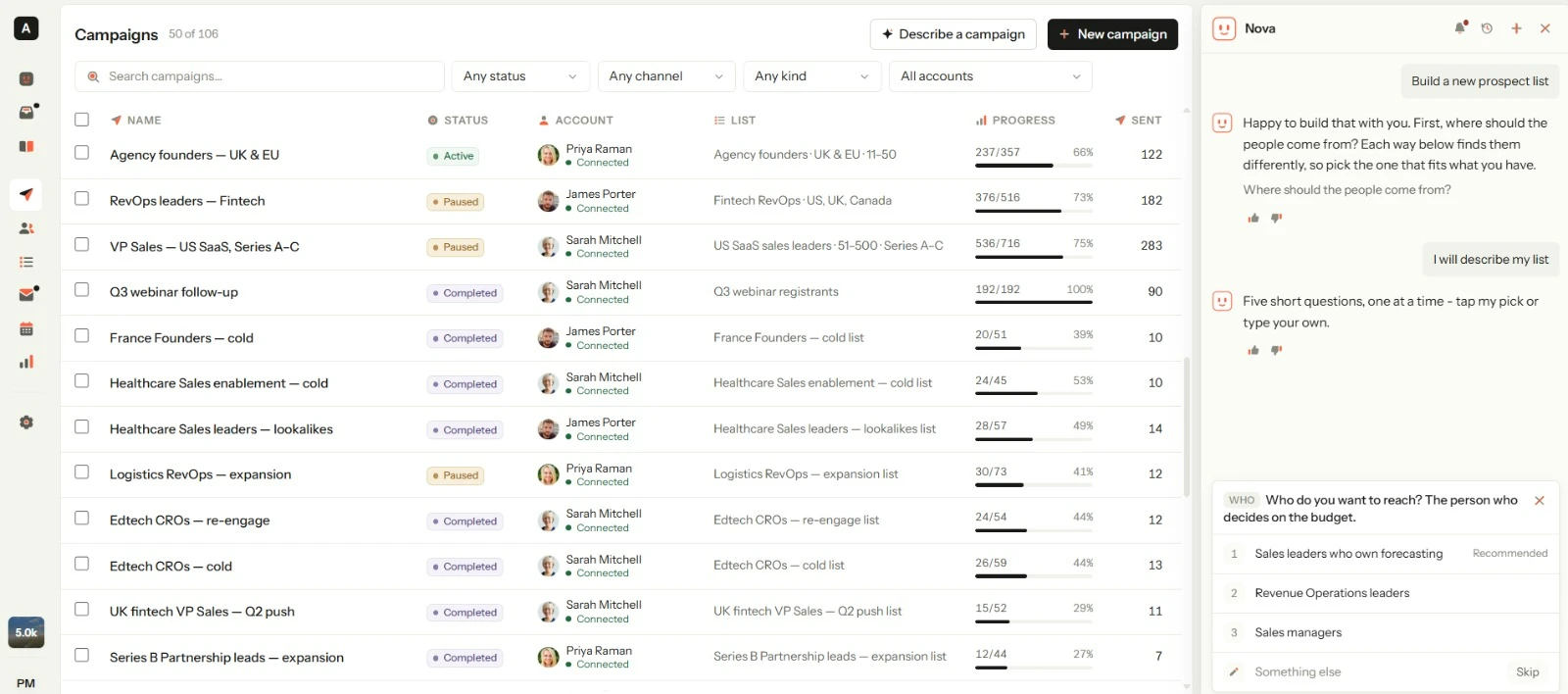
No seven-step wizard. Ask for what you want from any screen and Nova builds it, fixes it or changes it, then shows you exactly what changed.
Build
You“Create a campaign for HR directors at 50–200 person SaaS companies in Germany”
The list, the steps and the messages, ready for you to review.
Fix
You“Why did my campaign stop?”
The cause in plain words, and the fix.
Change
You“Pause everything on Sarah's seat until Monday”
Done, with a preview first when you want one.
Nova
You: Pause everything on Sarah's seat until Monday
Preview before I do it
Seat
Sarah · LinkedIn + email
Campaigns
3 active → paused
Until
Monday, 9:00 · then they resume
Queued sends
41 held, none lost
ConfirmCancelNothing changes until you confirm.
Open Nova from any page with ⌘ / (Ctrl / on Windows).
Nova, the SDR · with your prospects
The reply is where meetings are won.
When a prospect answers, Nova drafts the reply from what you've taught it, waits for your approval, and books the call on your calendar.
LinkedIn and email, as one thread.
01
A prospect replies
On LinkedIn or email. It lands in one inbox either way.
02
Nova drafts the answer
From your website, decks, pricing and objection notes. Nothing invented.
03
You approve it
The reply waits in your review queue. Send it, edit it, or answer yourself.
04
The meeting lands on your calendar
The call is booked and the thread stays attached to it.
Drafts never send on their own. Nothing leaves your account until you approve it.
Inbox · LinkedIn
11:42 pm
LF
Lena Fischer
Head of People · Halden Systems
Interesting. How does it work, and what would it cost for a team of twelve?
Nova drafted a reply · waiting for your approval
Thanks Lena. It sits on top of Personio and gets each new hire set up in under a day — contracts, equipment and accounts, without the spreadsheet. On the price for twelve seats, I'd rather give you an exact number than a rough one, so I've checked with Sarah and you'll have it this afternoon.
FromOnboarding-guide.pdfIntegrations pagePrice for 12 seats · asked Sarah
ApproveEditReply yourself
You stay in charge
Nothing goes out that you didn't allow.
Choose how much Nova does on its own, per workspace and per action, and change it whenever you like.
How much Nova does on its own
Workspace: Loomlane · Action: replies
Nova suggests
You write everything.
Nova drafts, you send
Nothing goes out unseen.
Most teams start here
Nova sends, you're notified
Step in whenever you want.
Nova runs
It asks only when unsure.
Nova suggests
You write everything.
Nova drafts, you send
Nothing goes out unseen.
Most teams start here
Nova sends, you're notified
Step in whenever you want.
Nova runs
It asks only when unsure.
Review queue
Every message Nova wants to send waits here until you approve it, one by one or in bulk. Edit it first if you like.
Limits you can see
Up to 400 new leads a day and 1,500 a rolling week per seat, and up to 100 a day per campaign. Nova works inside them.
Blocklist
Block a person or a whole company once, and every campaign, seat and list leaves them alone.
Full history
Every action Nova took, when, and why.
The platform
Everything Nova works on, you can open.
Nova runs on the same screens you do. Nothing happens in a box you can't see.
7ways to build a list
LinkedIn, Sales Navigator and Recruiter searches, job applicants, people who engaged with a post, a CSV, or native prospect search.
11actions in a flow
Visits, likes, comments, follows, invites, messages, InMails, emails and tags, branching on six conditions such as accepted, replied or opened.
2channels, one flow
LinkedIn and email in the same sequence, and replies from both land in one inbox.
15teammates per workspace
Owners, admins and members, with seat access set per person. Create as many workspaces as you need.
Connects to the tools you already use
HubSpot
Later syncs update, never duplicate
GoHighLevel
Leads kept in step
Webhooks
Anything with a URL
Calendars
Google & Microsoft calendar booking
For agencies
A separate Nova for every client.
Each client gets its own voice, its own knowledge, its own rules and its own numbers. Switch between them instantly.
Win a client Monday, send Wednesday
Clone a client.
Duplicate a whole setup: sequences, messaging, tone, campaign structure. Swap the offer and the list.
Access
Exactly who can send from where.
Give each person access down to the client and the account. Transfer ownership cleanly when someone leaves.
Pricing
Same Nova. You decide how far it goes.
Nova builds your lists, campaigns and messages on both plans. On Premium, it answers the replies too.
Nova is the AI SDR inside allconnects. Inside the app, ask it to build, fix or change anything. With your prospects it drafts and answers replies, handles objections and books meetings on LinkedIn and email, as one conversation.
What if Nova says something wrong to a customer?
Nova answers only from what you've taught it: your website, documents, pricing and notes. When a question can't be answered from that material it asks you instead of guessing, and on the default setting you approve every reply before it goes out.
Will Nova pretend to be me?
No. Nova works on your behalf, but if a prospect asks directly, it says it's an assistant working with you and lets you know.
Is it safe for my LinkedIn account?
Yes. Daily limits, human-like delays and account rotation keep you inside LinkedIn's terms, and the limits are always visible. Nova stops before your account is at risk and tells you why it stopped. You can pause a campaign, a client, or all sending with one switch.
How much control do I have?
As much as you want. Nova answering replies is a Premium feature, and by default you approve every reply in the review queue before it goes out. Change the level per workspace and per action, any time.
What is a seat, and what is a credit?
A seat is one LinkedIn account plus one email account. A credit pays for one email address found (a phone number is five), one answer from Nova in chat, or one conversation Nova replies in on Premium. Whatever Nova does for you inside an answer costs nothing extra, and an answer that fails is never charged. Each seat adds 500 credits a month on Standard or 1,000 on Premium, shared by your whole team.
Do I need Sales Navigator?
No. The native search in allconnects filters by seniority, industry, headcount and buying signals. You can also import from a Sales Navigator URL, a LinkedIn search, post engagers, job applicants, or a CSV.
Does it work with my CRM?
HubSpot and GoHighLevel natively, and webhooks for everything else.
Can I use allconnects for my agency clients?
Yes. Each client gets its own Nova: its own voice, knowledge, rules and reporting. Clone a setup in minutes, and transfer ownership cleanly when people change.
Is there a free trial?
Not self-serve. Book a call with our team and we'll set one up for you.
Can I cancel any time?
Yes. Monthly plans cancel at the end of the period; annual plans run to the end of the year.
Get started
Twenty minutes to your first campaign.
Connect a LinkedIn account, paste your website, and Nova builds the first campaign with you. Nothing sends until you approve it.